kkmOS: Digitalization Meets Crisis Management
Common Operational Picture – Create a shared situation picture for various organizations and share layers effortlessly.
The 3 Pillars of Staff Work
Modern crisis management requires precise and cross-organizational situation management – it's not an option, but a prerequisite for successful management. According to the requirements for staff work, documentation and visualization must be complete and audit-proof for every operation. Previously, this process was often tedious, time-consuming, and error-prone through analog means or isolated island solutions. kkmOS automates information flow, connects all stakeholders in real-time, and creates a reliable foundation for your decision-making in operations.
Situation Map Module
Enables drawing and sharing geoinformation such as tactical symbols, objects, and danger zones in real-time.Operation Log Module
Documents crucial information and events during operations automatically or manually, which can be shared with the situation map and thus serve information exchange.Staff Management Module
Supports staff management in organizing message inputs and outputs, as well as communication between staff functions.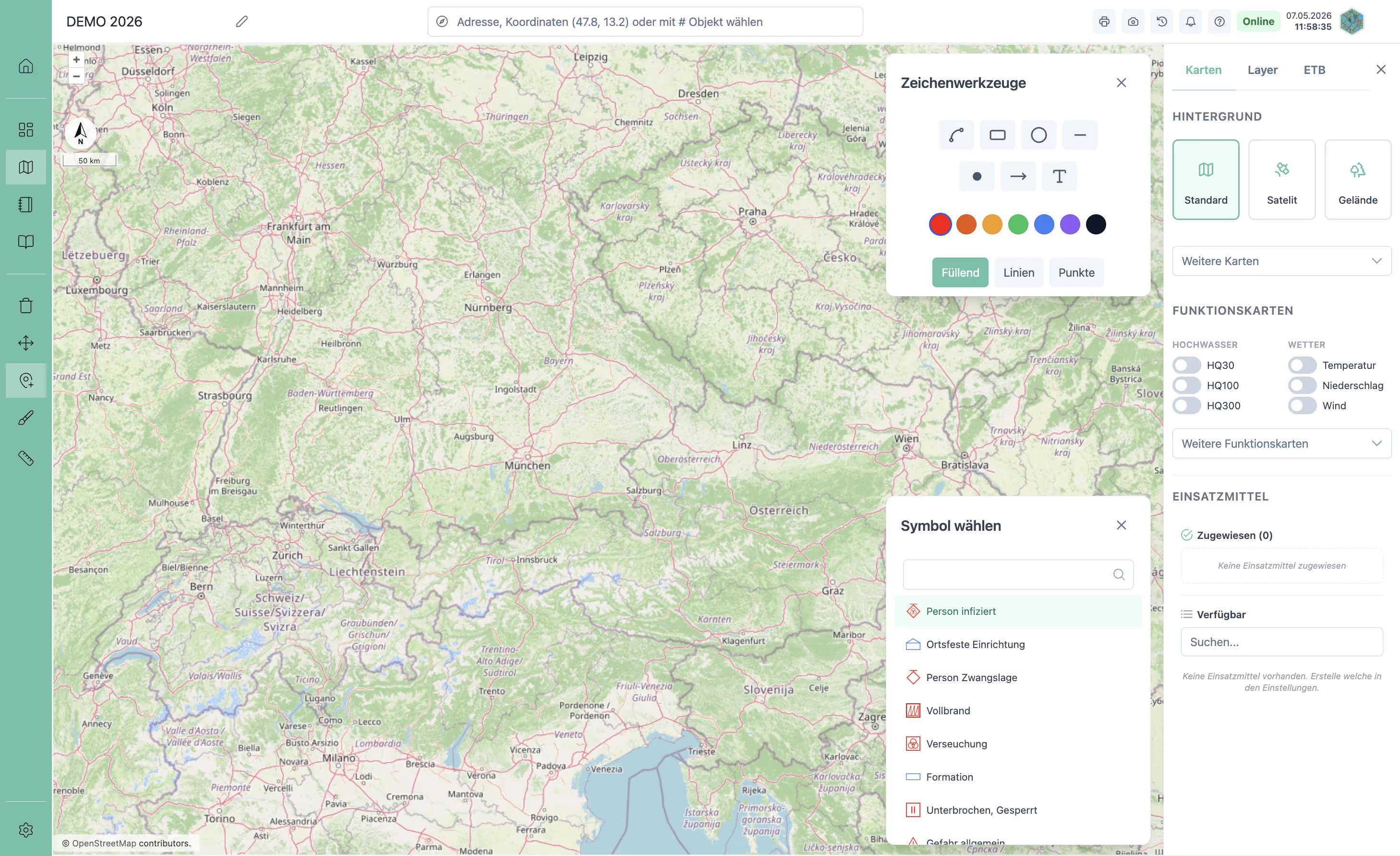
Situation Map
The situation map is the central spatial tool of the platform. It captures the overall situation visually and supports tactical decision-making – with real-time synchronisation between everyone involved.
- Drawing tools & symbolsPoints, lines, arrows, polygons and a symbol library based on tactical standards (ÖNORM S2308) with integrated search.
- Resources on the mapPlace resources directly on the map – with their current status.
- Thematic maps & live dataFlood zones, precipitation, water levels, traffic and weather warnings at the flick of a switch – plus your own map services.
- Layer systemShareable layers for cross-organisational collaboration – share content in real time with other kkmOS instances.
- Direct operation log integrationLog entries can be created directly from the map and linked to map objects.
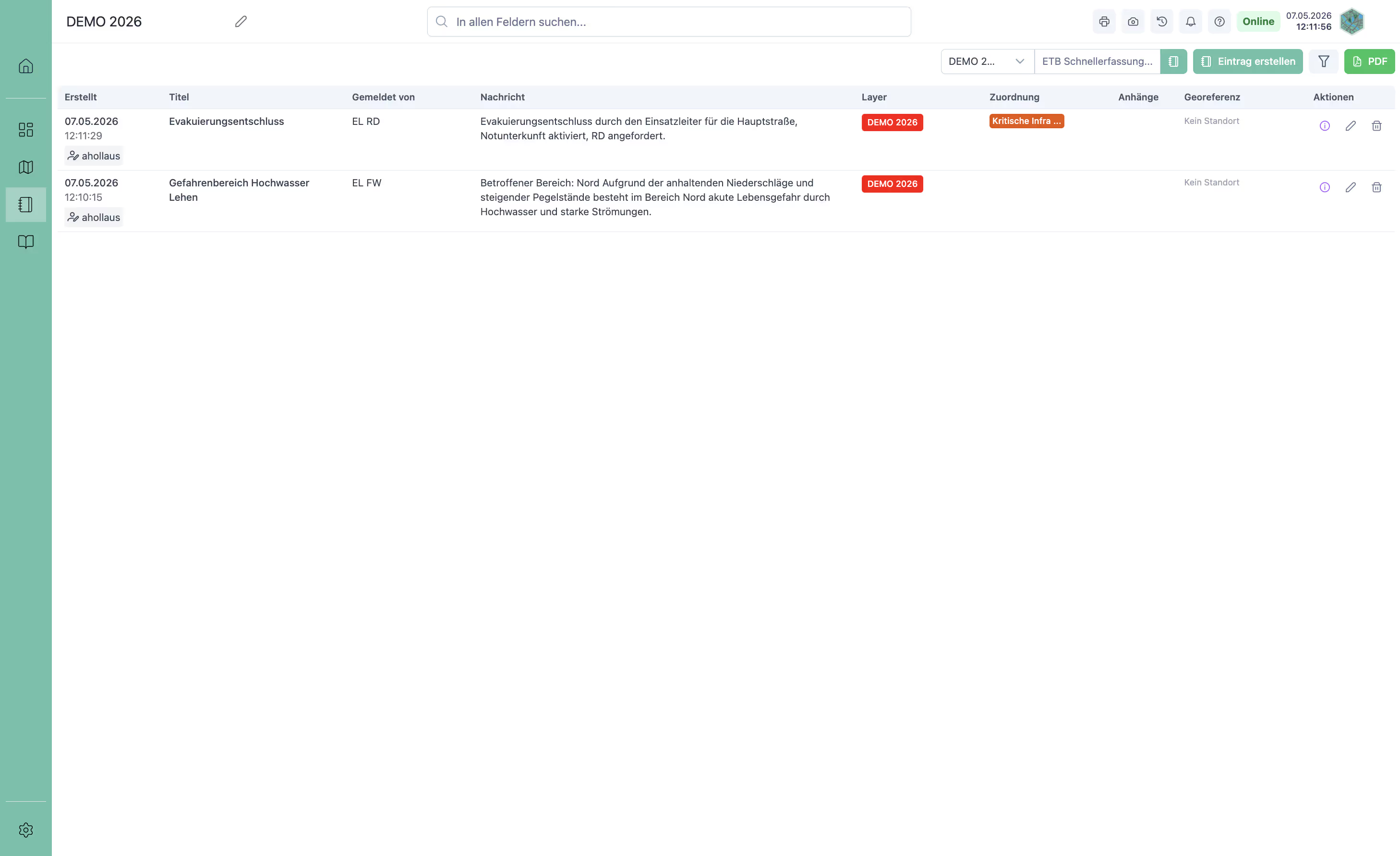
Operation Log
The operation log provides complete, chronological documentation of all events, messages and measures. It is the basis for decisions, preservation of evidence and follow-up.
- Automatic entriesEvery change to the situation on the map is documented automatically – no manual recording needed.
- Structured inputMessages with title, reporter, time of report, georeference and tags – stored in an audit-proof manner.
- PDF export & attachmentsExport the entire course of the operation as a PDF; attach photos and documents directly.
- Jump to the mapJump from any log entry straight to the linked map object.
Staff Management
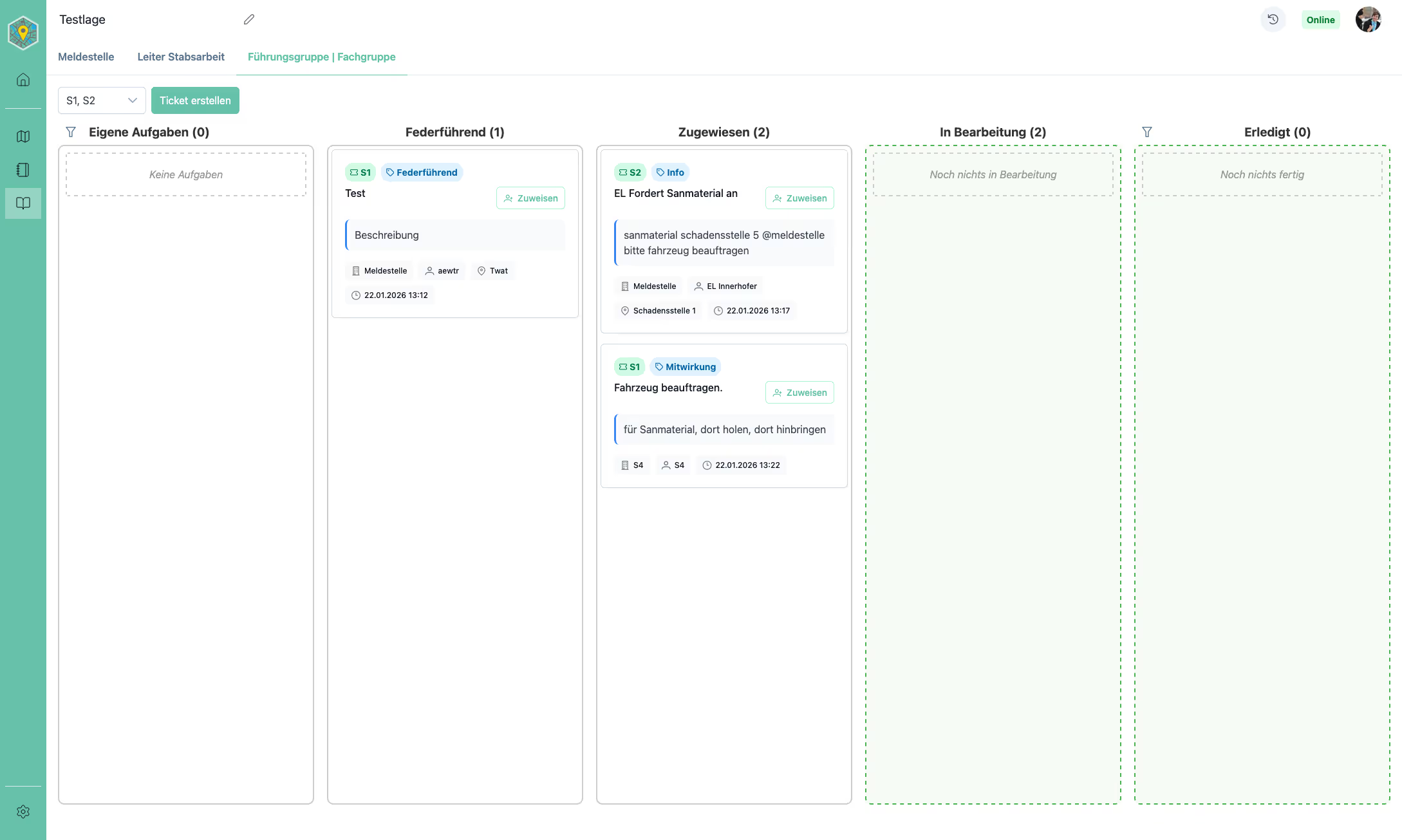
The staff management module coordinates the flow of information in the crisis staff. It is based on a ticket-based Kanban system and is complemented by FORDEC decision-making, checklists and operation tables.
- Kanban boardThree role-specific views: message centre, head of staff and specialist areas – suitable for full and reduced staffs.
- Forward messagesSend messages directly to the staff of another level.
- FORDECStructured decision-making step by step – with a reminder for the check step.
- ChecklistsTemplates for standardised procedures, loaded into the active situation in seconds and ready to tick off.
- Operation tablesReady-made overviews for forces, incident sites and personnel – or freely designed, with #-links to map, tickets, FORDEC and personnel.
Operations, forces and connectivity
Beyond the three core modules, kkmOS covers the whole operation – from a single vehicle to collaboration across levels and organisations.
Resources & forces
Create resources once and use them in every situation. Strength and forces per incident site always up to date.
Incident sites
Damage sites with status, incident commander, people affected and the forces on site.
Capture & share the situation
Situation status for the briefing, situation report to the higher authority, complete printout for documentation.
Connected
Link situations across several levels, give other kkmOS systems a view of the situation picture and show it publicly without login.
Open interface
Bring the situation picture into your GIS systems via the OGC standard.
Resilient
Local servers keep you operational even during network outages.
See kkmOS in action
We would be happy to show you how it works in detail – using a scenario from your everyday work.
More platform features
Besides the three core modules, kkmOS combines a range of further tools that make the difference in an operation.
Dashboard
The crisis staff's control centre – incident site overview with map, mission & objectives, ticker, contact list, statistics and media library. Print all staff content as a PDF with one click.
Timeline
Chronological view of how the situation developed, with timestamps. Compare two points in time for briefings and handovers.
Public sharing
Any situation can be shared as a public link – no login, directly in the browser. The map shows the situation in real time for citizens, media or other agencies.
Citizen reports
A permanent link and QR code per organisation: citizens report in three steps with photo and location. The report reaches the crisis staff immediately.
Tags & assignments
Link log entries, checklists, messages and tables across modules and tools with uniform tags.
#-links
The # character is the universal linking function – anywhere in kkmOS, a searchable list of all relevant items of the current situation appears instantly.
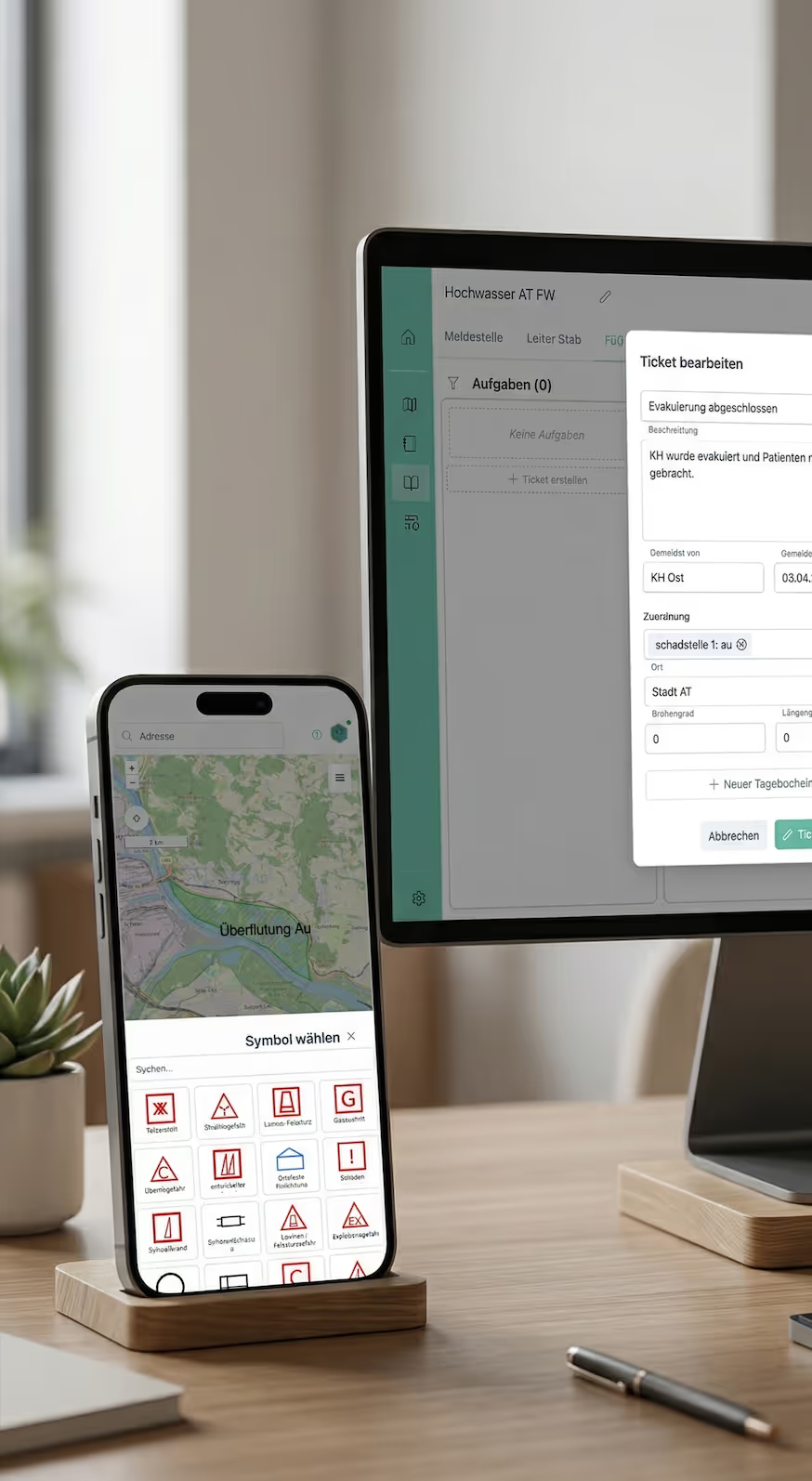
Software for digital situation management
Frequently Asked Questions about kkmOS
kkmOS is a web-based tool for the digital visualization and management of extraordinary operational situations that go beyond an organization's routine operations. These include natural disasters, major traffic accident drills, or special situations such as medical services at large-scale events. It enables operational data to be mapped in real-time on an interactive map and shared with other stakeholders—without the need for complex installation or registration in the base system.
kkmOS replaces analog paper maps and isolated, fragmented solutions with a centralized digital situation map that remains up-to-date and can be easily shared via a link. Thanks to open standards – such as the OGC interface (OGC API – Features) – true interoperability is achieved, allowing seamless data exchange between different organizations. Manual, error-prone updates are eliminated, as all changes are logged in an audit-proof manner and automatically recorded in the incident log. For maximum reliability, local servers combine full offline capability during network outages with the unlimited availability of the online portal, which reaches all participants without barriers or registration.
kkmOS is the central solution for emergency organizations such as fire departments, emergency medical services, police, and civil protection agencies that rely on fast and reliable situation mapping in crisis scenarios. Public authorities and administrations also benefit from the platform by efficiently sharing coordinated information with partners. Furthermore, operators of critical infrastructure, such as airports or energy providers, use the system for the precise visualization of their evacuation and security plans. Find out more on our pages for municipalities, district and state crisis staffs, emergency services, and companies and event organisers.
The purely browser-based application allows for intuitive situation management immediately after login. Users manage complex scenarios across multiple layers and draw polygons, lines, or points that are automatically linked to precise metadata such as timestamps. Multimedia content, such as smartphone photos or drone imagery, can be seamlessly integrated to supplement the situation report. All actions are logged in the integrated incident log and saved as unalterable snapshots for audit compliance. The platform promotes active collaboration within the organization as well as easy sharing with partners via a read-only link. Thanks to local servers, the system remains fully operational even during network failures and automatically synchronizes all data as soon as the connection is restored.